Slides (and thoughts) from MWLUG – XPages & jQuery DataTables
Posted: August 24, 2016 Filed under: Uncategorized 7 CommentsLast week at MWLUG in Austin I was fortunate to be given the opportunity to speak for the first time at a conference. I was very happy with the turnout for my session as well as the positive feedback from the content. I even got a thank you at the airport on the way out of town. (thanks, Tom!).
The slides are available here:
During the session there were some very good questions, which made me realize I probably need to clarify some things in my presentation and fill in some gaps. Over the next few weeks/months I plan on doing that, as well as expanding on some of the topics I covered.
From the conference as a whole, I took away some great information and hope to start utilizing it immediately. The tone of the conference was clear – CYA by looking at non-Domino options. I should note here that the concepts I covered in my session apply to any environment where data is being delivered via REST, not just Domino/XPages.
From a personal standpoint, I need to get better at meeting more people at conferences like these. It isn’t a strength, but needs to become one. I did have some great conversations and was able to do a little brainstorming with Red Pill about their graph implementation. I am really, really intrigued by the possibilities that provides.
Finally, thank you to Richard Moy and the team that made MWLUG a great success. Can’t wait until next year.
I’m speaking at MWLUG about…
Posted: June 29, 2016 Filed under: Uncategorized Leave a comment… XPages and DataTables (the jQuery plugin, not the XPages data source). This is my first opportunity to speak and present at a technical conference so I’m running the full gamut of emotions – from excitement to nervous and back again!
In my session, I’m hoping to share my experiences with using DataTables as the primary tool for displaying view data fed via REST services in my XPage applications. This experience led to a single, configurable custom control that, in conjunction with a Domino view administration tool, can be dropped into any XPage or custom control where view data is needed. My goal was to create less back-end views and provide more UI functionality while minimizing the need to make design changes when views need to be added or updated.
DataTables is incredibly powerful, and I’ve found that every time I thought I was going to have to customize something, inevitably, DataTables had that functionality built in, or at least had tools that made it easier to implement.
Hopefully this topic interests you as much as it does me and I hope to see you there!
XPage loading slow? Check your document datasource
Posted: December 16, 2015 Filed under: Uncategorized 2 Commentstl;dr – If you have the “compute” option of a document datasource enabled, make sure:
- The underlying form does not have fields perform a DbLookup to a view that has @Today or @Now in a column/selection formula.
- If the form has embedded views, make sure the column/selection formulas of the view do not utilize @Today or @Now.
For the past year+ I’ve been in the midst of modernizing a very, very large Lotus Notes application that is comprised of many databases. Over the past few weeks, as I started building out the next phase, one particular XPage was loading extremely, EXTREMELY, slow, like in the neighborhood of 8 seconds to open. Not good.
Since we are modernizing an existing application (which is the lifeblood of the company), we are operating in a co-existence environment. This means dropping the XPages layer on top of the existing environment versus building and architecting an application from scratch. So in this case, the XPage in question has a document datasource that utilizes an existing Notes form.
After examining the XPage and determining that the performance issue was not there, I turned my attention to the underlying form. I do have the “compute” option turned on:
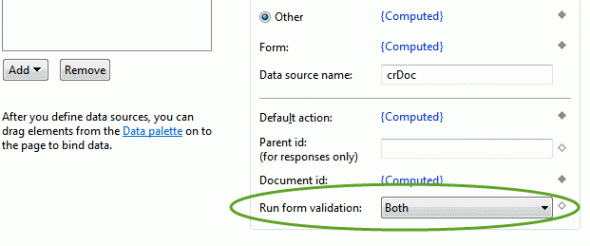
Now, keep in mind I did not build this form originally, so I am getting up to speed with it’s inner workings as I’m building out the XPages side.
My discovery process went something like this:
“There are 3 embedded views. Ok. No Problem. Lots of Notes forms have embdedded views.”
“This column of the first embedded uses @Today. That’s bad.”
“Wait … every embedded view has a column with @Today? WTF!! OK, we can deal with this.”
“This field is doing a lookup to a view with @Today … and this field … and this field.”

Using @Today and @Now in a view is bad enough … but six times on a form? OUCH!
This was a flat-out performance catastrophe. One of the first performance tips you learn in Notes Client development is do not use @Today or @Now in view column or selection formulas unless you absolutely have to. Even then, consider running an agent nightly to update the view with a hard coded date instead.
Luckily, the issue was discovered and handled, reducing the page load time from 8s to ~50ms.
My first #MWLUG … what was I waiting for?
Posted: August 23, 2015 Filed under: Uncategorized 2 CommentsFinally back home and reflecting on the past week and how much I enjoyed MWLUG 2015. My only regret is I didn’t attend sooner!
A sign of a good technical conference is having to make tough decisions on which sessions you want to attend and I found myself in that position more than once over the past few days.
A sign of an incredibly COOL conference? … DRONES!
I accomplished all my goals for the week – taking away things I can use right away, getting ideas for the future, catching up with people, and of course meeting new people. Everything was capped off nicely by winning the Sonos from LDC VIA. The first thing I did when I got home was hook that baby up!
Thanks to Richard Moy, Lisa Duke, and Darren Duke (and anyone else I’m missing) for planning and executing an incredible conference. I can only imagine how much work goes on behind the scenes throughout the year to make this happen. I’m already looking forward to next year in Austin with great anticipation.
They say everything is bigger in Texas. I have a feeling MWLUG 2016 will be too.
Modernizing A Notes App With XPages (MANA-X) Part 1 – Introduction
Posted: September 3, 2014 Filed under: Uncategorized | Tags: Lotus Notes, Modernization, XPages 2 CommentsA few weeks ago, I started a new position. For this position, I was hired specifically to lead the transition of a key Lotus Notes client application into the XPages world, where modern capabilities and UI can be merged together to create a great user experience and better support the business processes going forward.
Actually, this application is more than just a “key” application. It is THE application. Well, technically, it is several applications, or modules, all tied together under one umbrella, which have supported just about every aspect of a business that has tripled in size in the last 10-15 years.
While there is an urge to jump right in and start coding, there are many things to consider ahead of time:
- Technical – Which framework(s) to use? Getting the development team up to speed on source control for better code management. Developing for IE9/IE11.
- Cultural – How to introduce users to a modern web application when they are used to working in the Lotus Notes client?
- Infrastructure – Keeping users productive with high availability. Making sure remote users do not have performance issues.
This is in no way intended to be a comprehensive list; These are just a few of the issues we’ve started to discuss as a team in the early stages of project planning.
Over the course of the coming months (years?), I’m hoping to share our experiences of moving this massive application to XPages and all of the successes and challenges that come with that (as much as I can, anyway).
Disclaimer: Any opinions and views expressed are my own and not necessarily those of my company. This series is intended as one company’s experience of moving an application to XPages and not a definitive guide on how to migrate an application to XPages.
XPages tip: Using jQuery class selectors with hidden inputs
Posted: August 18, 2014 Filed under: Uncategorized | Tags: jQuery, XPages 2 CommentsIf you cut your XPages teeth by using the out-of-the-box-included dojo libraries, then you are probably intimately familiar with dojo.byId(“#{id:myElementID}”) to locate elements on your XPage based on the id attribute.
After starting to weave jQuery into your projects, you probably realized pretty quickly that the jQuery id selector syntax of $(“#myElementID”) does not work well with XPage component ids. But of course there is a solution for that – Marky Roden’s XSnippet which wraps the jQuery ID selector function in a XPage version.
Due to the above issues with getting elements by ID in jQuery, you probably started using class selectors such as $(“.myClassName”). This is all fine and good – until you go to add a class to the properties panel of a hidden input control:

As you can see from the screenshot above, there is no place to enter a class name in the properties for a hidden input control. Seems kind of silly, doesn’t it? It’s a field. Fields have classes. I should be able to add a class to a hidden field. Apparently not.
Luckily, there is an incredibly simple way to do this using the attrs properties in the basics section of the properties panel:

- Add a new attribute by clicking the plus sign
- In the name field, enter “class” (do not add the quotes)
- In the value field, enter the name of your class, for example, “myClassName” (again, no quotes)
Now, you should be able to access your hidden input using a jQuery selector.
My first OpenNTF project – Dojo Name Picker
Posted: July 25, 2014 Filed under: Uncategorized | Tags: Dojo, Name Picker, OpenNTF, XPages 8 CommentsA few years ago I created a Name Picker for an XPages project I was working on at the time. The application had several fields that required the selection of users from the address book, but the available options at the time did not fit the bill. In addition, this was the first XPages application for this user base after being firmly entrenched in Notes Client applications for many years. As a result, there was a need to provide some functionality that helped build a bridge from Notes Client to web/XPage applications. Being able to select users from an address book in a similar manner as the Notes Client was a good place to build this bridge.

Multi Select Name Picker

Single Select Name Picker
When I first started building this control, the ExtLib version did not exist yet. Even after ExtLib was released, the environment where this was born did not have ExtLib installed on their servers. In my testing against the ExtLib name picker, this version outperformed it using the 40k entry address book, fakenames.nsf, as well as provides functionality that does not exist in the ExtLib version.
The key features of Dojo Name Picker 1.0 include:
- Ability to choose People, People & Groups, or just Groups.
- Multi Select via a dual column dialog.
- Single Select via a single column dialog.
- Lazy loading of additional entries when scrolling up or down.
- Only creates one dojo dialog widget no matter how many names fields are needed on a form.
- In Firefox and XPiNC the dialog will also display the associated icon for an entry (IE and Chrome do not support option tag background images).
- Ability have the name picker execute a function with the selected value(s) being passed to the function as a parameter.
- Ability to specify a partial refresh target on dialog close.
- No dependency on ExtLib.
- Will work on 8.5.3 and above (will probably work on 8.5.2 but this release has not been tested on that version).
You can test the name picker for yourself via a live demo here.
You can view this project on OpenNTF here.
Future Enhancements
While I feel this is a good, solid release, there are some improvements I would like to make:
- Bootstrap version (coming soon!) .
- Improved caching.
- Ability to return selected items as a JSON string.
- Ability to define additional fields to pull from the NAB
- Support multiple address books
Thanks for checking it out!
Copying Custom Controls
Posted: July 17, 2014 Filed under: Uncategorized | Tags: Custom Controls, tips, XPages Leave a commentThis tip is pretty simple, and it might be common knowledge to most people, but I stumbled onto it pretty much by accident.
Copying a custom control from one XPage to another is fairly common, but when you do so and go to build your new page, you get the message:
The prefix “xc” for element “xc:ccTest” is not bound.

Previously, I never really bothered to look into this message any further. I took the easy way out and simply dragged a new copy of the custom control onto the XPage, copied any custom properties (if any), and went on my way. However, this can get annoying REAL fast if you have a lot of custom controls that need to be copied.
Luckily, there is a ridiculously easy way to quickly get rid of the above message.
When you create a new Xpage, the standard markup looks like this:
<?xml version="1.0" encoding="UTF-8"?>
<xp:view xmlns:xp="http://www.ibm.com/xsp/core"> </xp:view>
Look what happens as soon as you drag a custom control on to your XPage:
<?xml version="1.0" encoding="UTF-8"?>
<xp:view xmlns:xp="http://www.ibm.com/xsp/core"
	xmlns:xc="http://www.ibm.com/xsp/custom">
	<xc:ccTest></xc:ccTest>
</xp:view>
Adding the bolded line above to the xp:view tag of your page will allow you to copy custom controls to your XPage without frustration. At the end of the day is it really a big time saver? No. But at least you have a better understanding of the error message.
SSJS variables vs. scope variables
Posted: July 14, 2014 Filed under: Uncategorized | Tags: server side javascript, ssjs, XPages Leave a commentRecently, I ran into a strange issue that had me scratching my head for longer than I’d care to admit. I created a server side javascript object that contained a function, something like this:
var myVar = {
	load : function() {
		print ("performing some sort of function");
	}
}
This ssjs object contained a set of functions that were used in conjunction with one another to perform various functions.
In some cases, these functions needed to grab some data from a viewScope variable, so I figured it made perfect sense to have a key name that was consistent with my ssjs object. I had a button that was setting the value like so:
viewScope.myVar = "foo";
Innocent enough, right?
According to the XPages runtime, apparently not, because I ended up with a message like this:
Error calling method 'load()' on an object of type 'String [JavaScript Object]'
OK, so what happens if we change our scope variable from viewScope to sessionScope?
sessionScope.myVar = "foo";
Same result:
Error calling method 'load()' on an object of type 'String [JavaScript Object]'
My assumption is, this has something to do with the way these objects are serialized. If someone has a better explanation, I’d love to hear it.
In the meantime, don’t give scope variable keys the same name as server side javascript variable.
Bloggity, blog blog blog.
Posted: July 12, 2014 Filed under: Uncategorized Leave a commentThis is it. Numero uno. The first blog post. The one where you sit in front of your keyboard trying to figure out exactly what you are going to say.
I plan on sharing my experience primarily with XPages, hence the name http://xpage.me. However, I reserve the right to branch out from that as I tinker around with other technologies.
Who am I? I have been a Domino developer/consultant for upwards of 16 years and have been fortunate to have some great experiences at some great companies. Currently, I’m a Senior Consultant at PSC Group focusing on (duh) XPages.
Why blog now? Why not? I really wish I had done this sooner – like years sooner. With so many people having contributed so much great information over the years, it’s easy to feel like I’m showing up at the party at 3AM and the keg is already kicked. But I’m finding that is not necessarily the case. Hopefully this platform will help me dig deeper into some things where I might have only scratched the surface previously, and provide some useful information back to the community.
Many thanks to my coworkers Kathy Brown, Brad Balassaitis, and Mark Roden for providing some gentle nudges of encouragement. Also, to David Leedy who is always encouraging people to do SOMETHING productive in the Domino/XPages community, no matter how big or small it may be. In the end, we all benefit.
 XPage.me